Skip to content
Adobe After Effects 2025 or newer

Text animation plugin for After Effects

Flexile’s Text page animates a text layer by character, word or line. Switch on any of 15 effects, pick In, Out or Keyframes, and Flexile builds native After Effects text animators that stay editable.

Free during beta on macOS and Windows. No card, no trial.

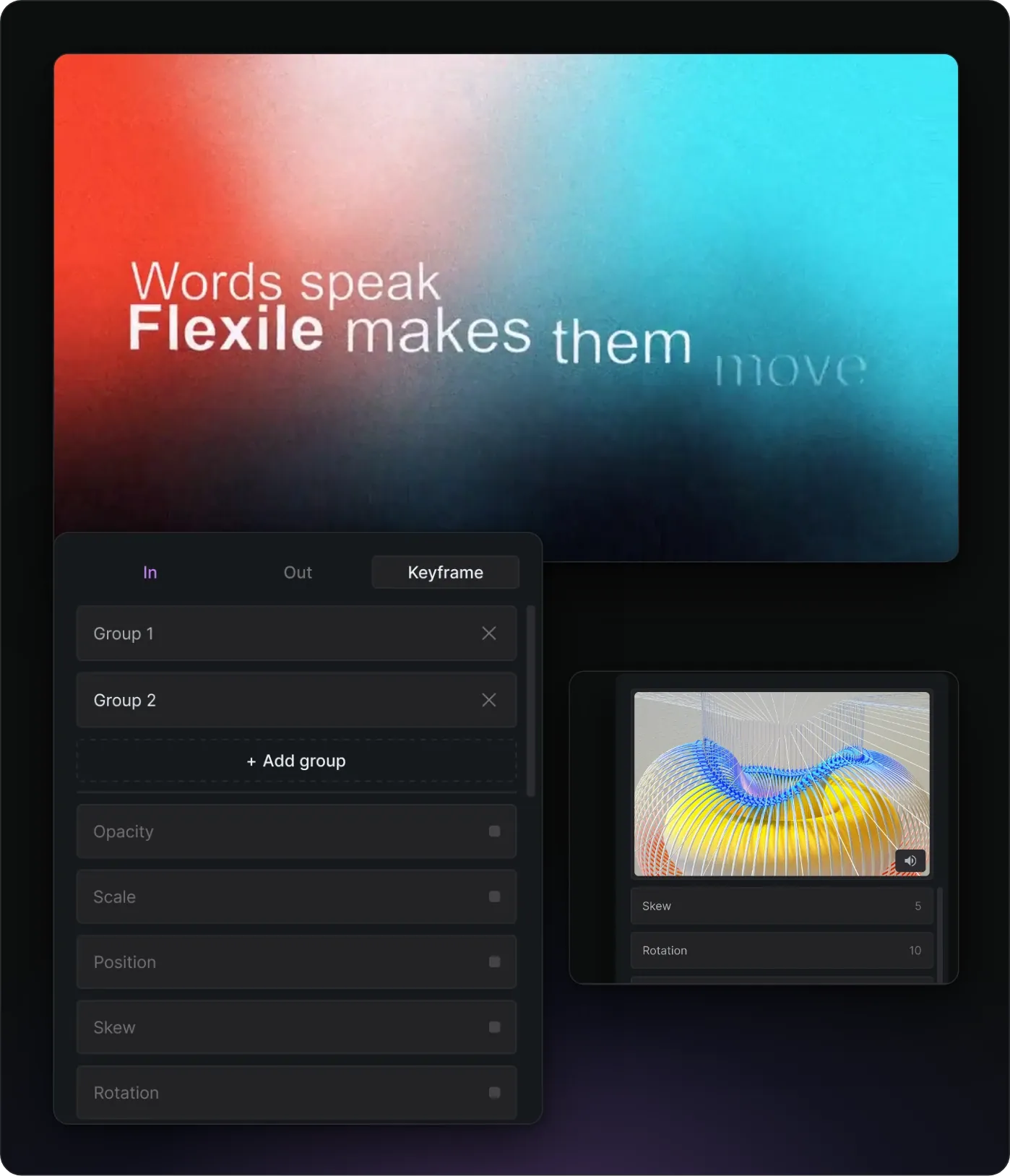
The title “Words speak, Flexile makes them move” animating in word by word, the Keyframe tab of the Flexile Text page with two groups and its effects, and effect values in the panel.

What you need

  • Adobe After Effects 2025 or newer

  • macOS or Windows

  • A free Flexile account: start for free

  • The extension, installed with the installation guide. After your first sign-in the panel adds its Flexile Events plugin, which tells it which layer you selected. On Windows this asks once for administrator approval. After Effects then needs a full restart.

  • One selected text layer, since the Text page works on one at a time.

How does the Flexile text engine work?

Select a text layer, open the Text page, pick a mode and switch effects on. Flexile adds a native After Effects text animator with an Expression selector, and each effect you switch on becomes a property of that animator with its own control on the layer. Expressions tie the selector and every property to those controls.

You end up with plain After Effects: animators in the timeline and controls in Effect Controls. Each effect you apply is one undo step.

Flexile keyframe text animation panel

In, Out and Keyframes modes

  • In animates each character, word or line into place from the layer’s start. With overshoot off it eases on an ease-out quint curve and starts exactly at the layer’s in point.
  • Out animates them away at the layer’s end. With overshoot off it eases on an ease-in quint curve.
  • Keyframes replays motion you keyframe yourself. You animate one Power slider, and Flexile plays it on each unit in turn, shifted by the Offset.

In and Out add five controls: Time, Offset, Enable Overshoot, Overshoot and Frequency. Offset is the delay in frames between units. With overshoot on, a damped spring curve replaces the quint curve. Each unit springs past its final value and settles, shaped by Overshoot and Frequency. Keyframes mode has two controls, Power and Offset.

For bigger moves, Keyframes mode lets a text layer hold several groups, each with its own effects.

Which text effects can you animate?

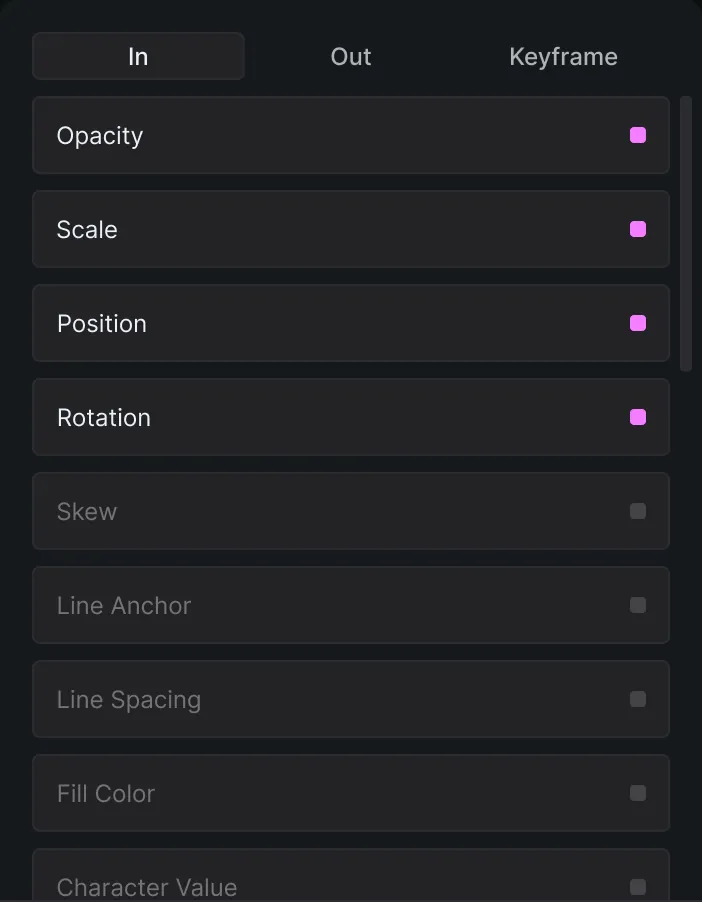
Fifteen, each mapped to a native After Effects text animator property. A group can mix any of them:

  • Transform: Position, Anchor Point, Scale, Rotation, Skew, Opacity
  • Look: Blur, Fill Color, Stroke Color, Stroke Width
  • Spacing: Tracking, Line Spacing, Line Anchor
  • Characters: Character Offset, Character Value

Each effect starts from a default you can change in Effect Controls: Opacity 0, Position 200 px down, Rotation -45°, Scale 0, Blur 15, Skew 30, Character Offset and Character Value 15.

Flexile text effect panel

Letter Flow, Base On and Anchor Point

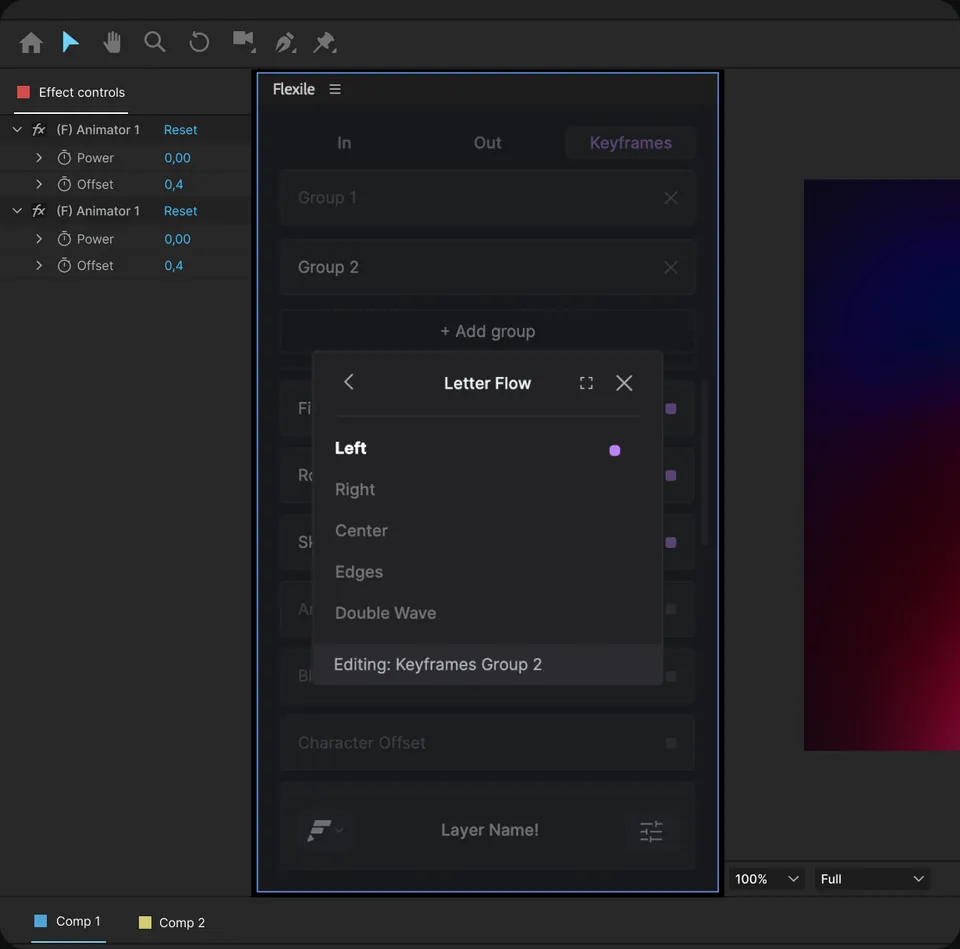
The settings menu holds the stagger and grouping options:

  • Base On picks the unit that gets its own timing: Characters, Characters Excluding Spaces, Words or Lines.
  • Letter Flow sets the stagger direction: Left, Right, Center, Edges or Double Wave.
  • Anchor Point sets the layer’s anchor point grouping: Character, Word, Line or All.

The menu also has Remove Effects and Enable 3D. Copy to clipboard saves the layer’s setup as JSON, and Paste from clipboard rebuilds it on each text layer you select.

For the native method, our guide to word-by-word text animation builds the same kind of reveal with After Effects’ own Range Selector.

See the Text page in After Effects

Silent clips from the panel. Its Learn page has interactive tutorials, including one for the Text page. They run in the same project as these clips, and the panel checks your work as you go.

Animate text in no time

Animate the IN or the OUT of a layer straight from its start and end, or build keyframe-based custom groups when the piece needs something more sophisticated. Both stay editable afterwards.

  1. Add the animation
  2. Edit it to give it character
  3. Push it further

This tutorial runs inside the panel, in the project from the video, and you get full access to that project.

Start for freeFree during beta. macOS and Windows.

Can an AI app animate text with Flexile?

Yes. Flexile has included an MCP server since 0.17.0, and the Text page is one of the panels it covers. An AI app such as Claude or Cursor can drive the same engine (modes, Base On, Letter Flow) or build a Range Selector reveal by characters, words or lines from a request like “reveal word by word”, “type on” or “premium title”. It can create the text layer too.

Every Flexile call is one undo step, and the panel shows the step the AI is on. You need Flexile 0.17.0 or newer, the panel open and signed in, and Allow AI assistants on. The AI guide shows how to set up Claude, ChatGPT or Cursor, and the page on the MCP server built into Flexile covers the rest.

How does Flexile compare with other text animation plugins?

Flexile is our product. Competitor details come from each vendor’s official page, checked in September 2026.

Most text plugins are preset libraries: you browse looks, from dozens to over a thousand, and apply one. Flexile is an engine: you combine effects and settings instead of picking a finished look.

  • After Effects itself: text animators with a Range Selector based on characters, words or lines, plus presets such as Typewriter.
  • Flexile: 15 effects, the In, Out and Keyframes modes and the stagger settings, written as native animators you can edit. Free during beta. You build and edit a Flexile text animation on one layer at a time.
  • Mister Horse Text Presets: 1,414 items, from character, word and line transitions to effects. It works with the Animation Composer plug-in and needs After Effects 2025 or newer.
  • PX-Kinetype by Pixflow: 64 kinetic typography elements with In and Out animations, free as of September 2026, for After Effects 2021 and above.
  • Vignette Typer Pro: $49 on Gumroad as of September 2026. 50+ presets, animation by characters, words or lines, and a background box that resizes to the text. After Effects 2019 and newer.
  • TextFlex on aescripts: the closest to Flexile’s approach. It animates characters, words or lines without keyframes, with Overshoot and Ease styles, directions, In and Out, marker sync for voice-over and editing across several layers. $23.99 with a free trial as of September 2026, for After Effects CC 2015 to 2026.

Pick a preset pack for a finished look in one click. Pick Flexile to build the move from effects and pay nothing during the beta, or TextFlex to edit across several layers at once.

The Text page is one part of Flexile for After Effects, next to easing, transitions, quick tools and the Audio page.

Which After Effects versions does Flexile support?

Flexile supports After Effects 2025 or newer, on macOS and Windows.

Do the animations stay editable?

Yes. Flexile builds a native After Effects text animator, and each effect reads its value from a control in Effect Controls. Change the control and the animation follows. Each effect you apply is also one undo step.

Can I animate several text layers at once?

You build and edit the animation on one selected text layer at a time. To reuse it, choose Copy to clipboard in the settings menu, select the other text layers and choose Paste from clipboard. Flexile rebuilds the setup on each of them.

Is Flexile free?

Yes, for everybody with an account during the beta: every feature, no card, no trial. The free period has no commercial restriction. Paid plans will be announced in advance on the pricing page and by email.

Still have questions?

Write to us at contact@flexile.io.

More in Flexile

The same panel also does this, free during beta.

  • Easing

    Ease every selected keyframe at once: 26 presets, Peak and Smart modes.

  • Transitions

    Preview a transition, double-click to insert it and retime it to the cut.

  • Beat sync

    Turn the kick, the bass or any frequency band into keyframes.

  • Auto subtitles

    Turn speech or lyrics into subtitle layers with a model on your computer.

  • MCP server for AI apps

    Let Claude, ChatGPT desktop or Cursor work in your After Effects project.

Free for everybody during beta

Every feature unlocked while Flexile is in beta. No card, no trial.

Start for free

After Effects 2025 or newer, macOS and Windows