Loading...
Tutorials
How to install Flexile in After Effects
Flexile is an extension for Adobe After Effects. This guide covers installing the extension on macOS and Windows, the required Flexile Events plugin, the Elements pack, updates, troubleshooting and a clean reinstall.
Sep 17, 2026
Tutorial
8 min read
Flexile is an extension that runs inside Adobe After Effects. It is not a browser extension. After installation it appears in After Effects under Window > Extensions > Flexile for AE.
In this guide
- What you need
- Install on macOS or on Windows
- The required After Effects plugin
- Elements pack
- Updates
- Troubleshooting
- Clean reinstall
What you need
- Adobe After Effects 2025 or newer, on macOS or Windows. Older versions may still load Flexile, but it is unstable there and we do not support it.
- A Flexile account. Create one at flexile.io first, you sign in inside the panel later.
- The extension ZIP from your dashboard download page.
Three parts, one manual step
Only the extension is installed by hand. Once you sign in inside After Effects, Flexile downloads and installs the required After Effects plugin and the Elements pack on its own. The manual instructions for those two further down are a fallback for when the automatic step fails.
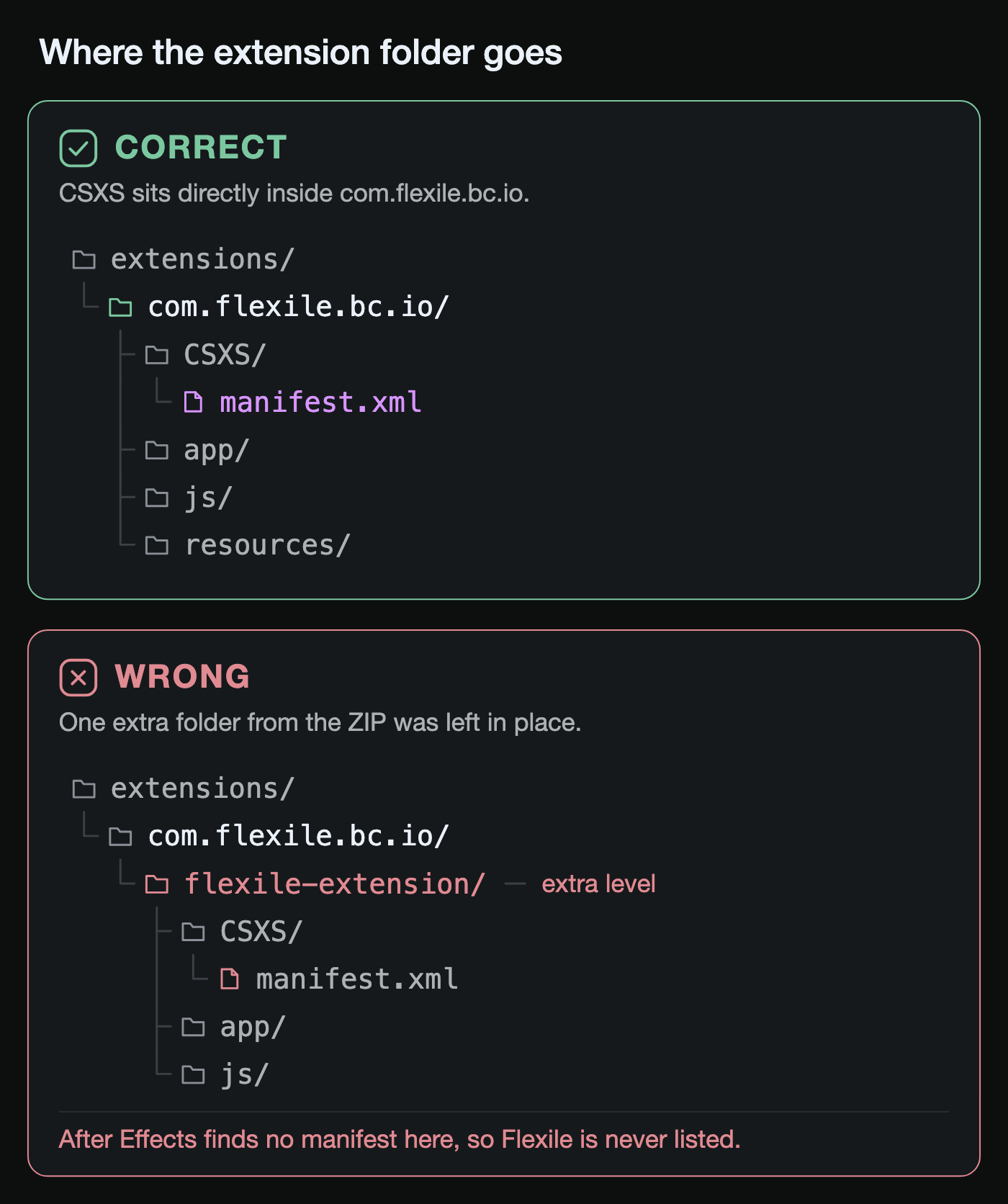
Both platforms end up with the same layout. Whatever you unzip, CSXS/manifest.xml has to sit directly inside the extension folder. One extra folder in between is the most common reason Flexile never shows up.
Install on macOS
- Download the extension ZIP from the dashboard and double-click it to unzip. You get a folder with
CSXS,app,jsand other folders directly inside. - In Finder choose Go > Go to Folder… and paste
~/Library/Application Support/Adobe/CEP/extensions. If theCEPorextensionsfolder does not exist, create it. - Move the unzipped folder there and rename it to
com.flexile.bc.io. The full path is~/Library/Application Support/Adobe/CEP/extensions/com.flexile.bc.ioandCSXS/manifest.xmlmust sit directly inside it, not in a nested subfolder. - Quit After Effects completely with Cmd + Q if it is running, then start it again. Closing the window is not enough.
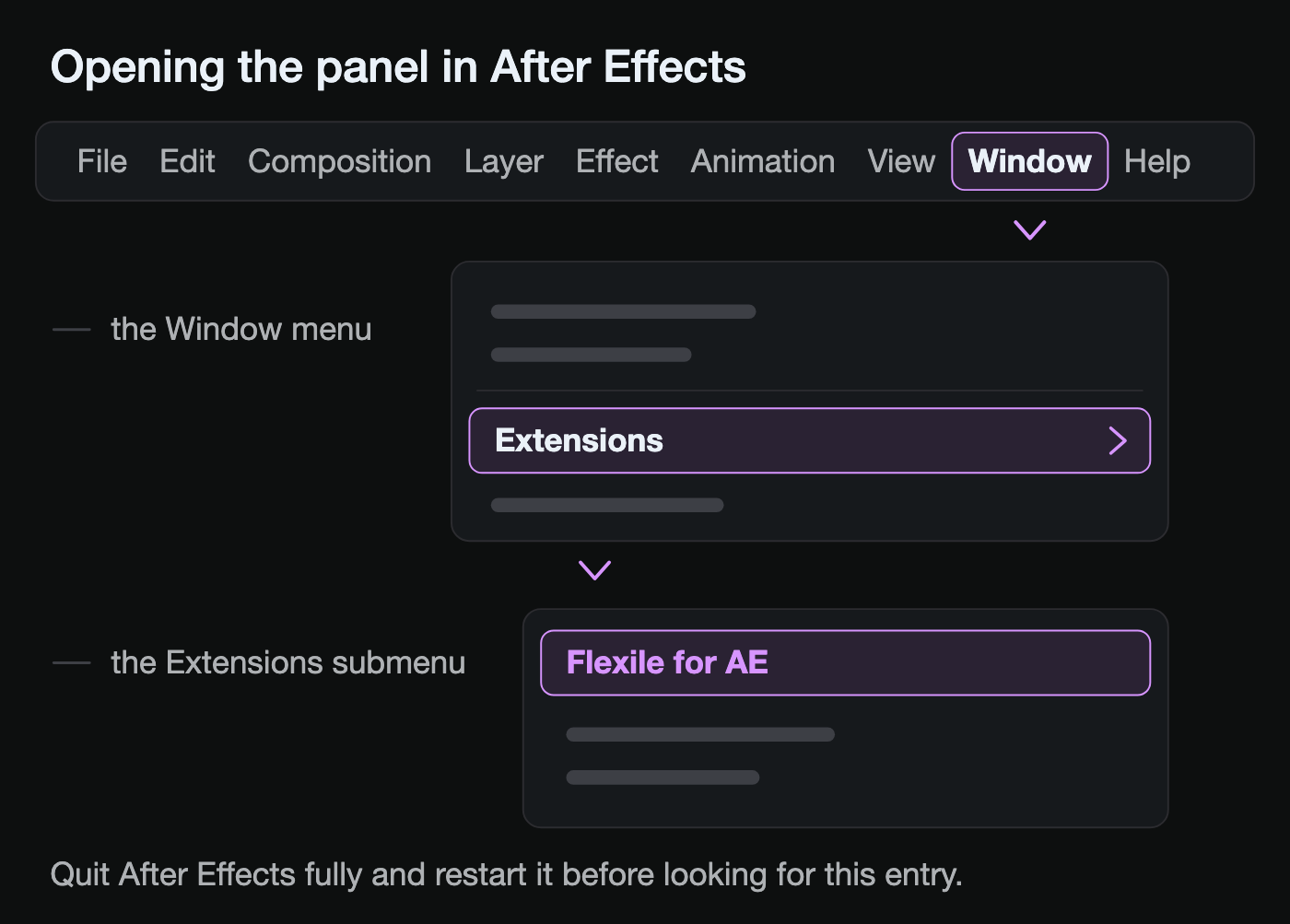
- Open Window > Extensions > Flexile for AE and sign in with your Flexile account (email and password, or Sign in with Google, which opens your browser).
If macOS blocks the panel or its helper the first time, allow it under System Settings > Privacy & Security and open the panel again.
Install on Windows
- Download the extension ZIP from the dashboard, right-click it and choose Extract All…. Check that
CSXS,appandjsare directly inside the extracted folder, not one level deeper. - Open File Explorer, paste
%APPDATA%\Adobe\CEP\extensionsinto the address bar and press Enter. Create theCEPandextensionsfolders if they are missing. - Move the extracted folder there and rename it to
com.flexile.bc.io. The full path isC:\Users\<you>\AppData\Roaming\Adobe\CEP\extensions\com.flexile.bc.io. - Close After Effects completely and start it again.
- Open Window > Extensions > Flexile for AE and sign in. Sign in with Google opens your browser and Windows may ask once to allow Flexile through the firewall; allow it, it only listens on your own computer for the login reply.
On both platforms the panel is opened from the same place:
The required After Effects plugin
Flexile needs a small native After Effects plugin called Flexile Events (Flexile_Events.plugin on macOS, Flexile_Events.aex on Windows). It tells the panel which layers you select. Without it Flexile cannot react to your work and many features stay disabled, so the panel will not let you continue until it is installed.
Automatic installation. Right after your first sign-in the panel shows "Required Plugin Setup" and installs the plugin by itself. On macOS this is silent. On Windows you get one administrator (UAC) prompt, approve it. Afterwards the panel asks you to restart After Effects: quit the whole application and start it again, then confirm in the panel. Restarting only the extension is not enough.
If you see "Flexile could not install the required plugin automatically", install it by hand as described below, restart After Effects, and choose "Yes, I restarted After Effects" in the panel.
Plugin on macOS
- Download the macOS plugin from the dashboard and unzip it. You get
Flexile_Events.plugin. - In Finder choose Go > Go to Folder… and open
~/Library/Application Support/Adobe/Common/Plug-ins/7.0/MediaCore. Create the folders if they do not exist. - Create a folder named
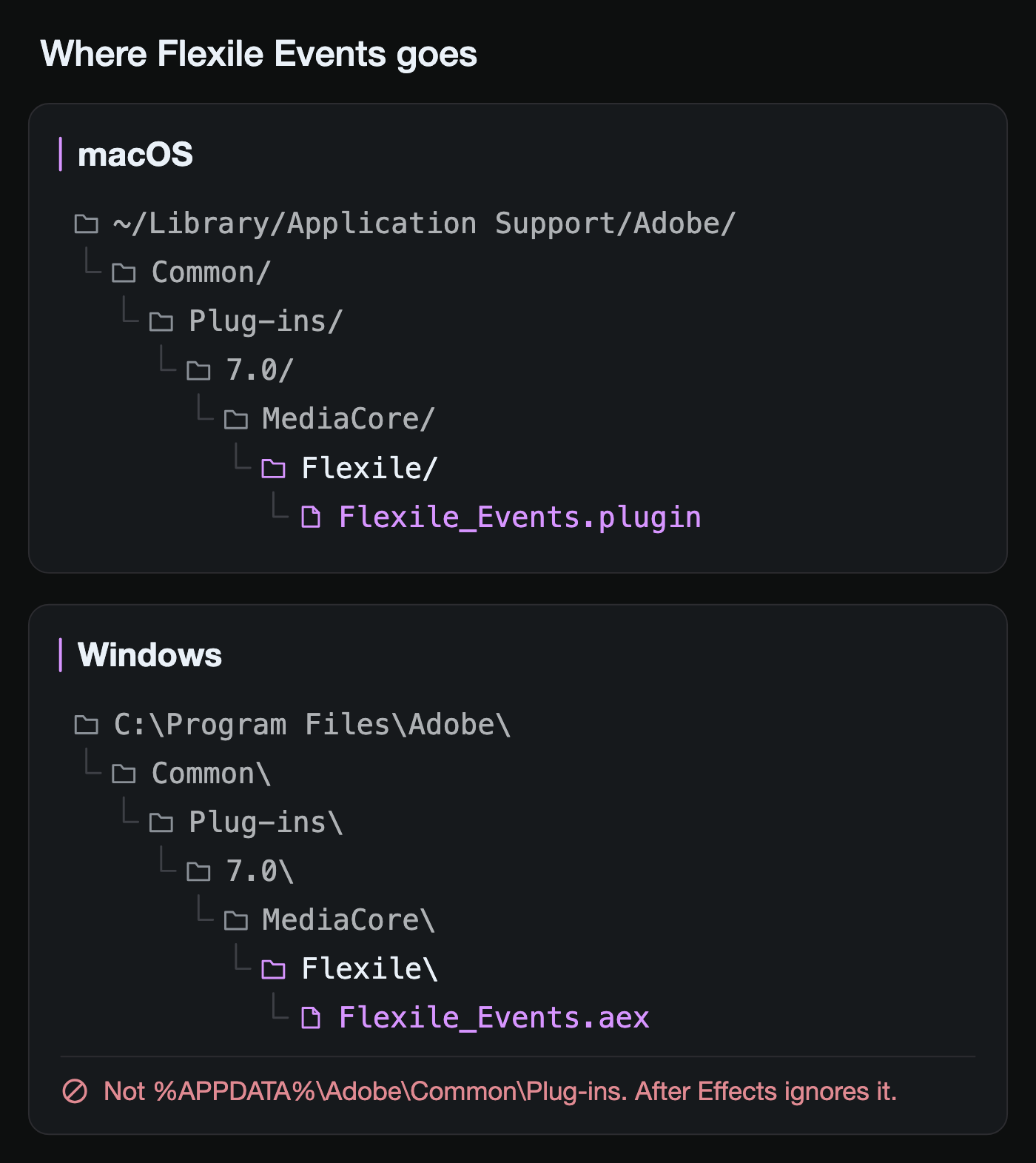
FlexileinsideMediaCoreand copyFlexile_Events.plugininto it. Final path:~/Library/Application Support/Adobe/Common/Plug-ins/7.0/MediaCore/Flexile/Flexile_Events.plugin. - Alternative location that also works:
/Applications/Adobe After Effects <year>/Plug-ins/Flexile/Flexile_Events.plugin(needs administrator rights). - Quit After Effects completely and start it again.
If macOS reports that the plugin was blocked because it comes from the internet, allow it under System Settings > Privacy & Security and restart After Effects once more.
Plugin on Windows
- Download the Windows plugin from the dashboard and extract it. You get
Flexile_Events.aex. - Open
C:\Program Files\Adobe\Common\Plug-ins\7.0\MediaCorein File Explorer. Create the folders if they do not exist (Windows asks for administrator permission, approve it). - Create a folder named
Flexilethere and copyFlexile_Events.aexinto it. Final path:C:\Program Files\Adobe\Common\Plug-ins\7.0\MediaCore\Flexile\Flexile_Events.aex. - Alternative location that also works:
C:\Program Files\Adobe\Adobe After Effects <year>\Support Files\Plug-ins\Flexile\Flexile_Events.aex. - Do not put it under
%APPDATA%\Adobe\Common\Plug-ins. After Effects ignores that folder on Windows and Flexile will keep reporting the plugin as missing. - Close After Effects completely and start it again.
Elements pack
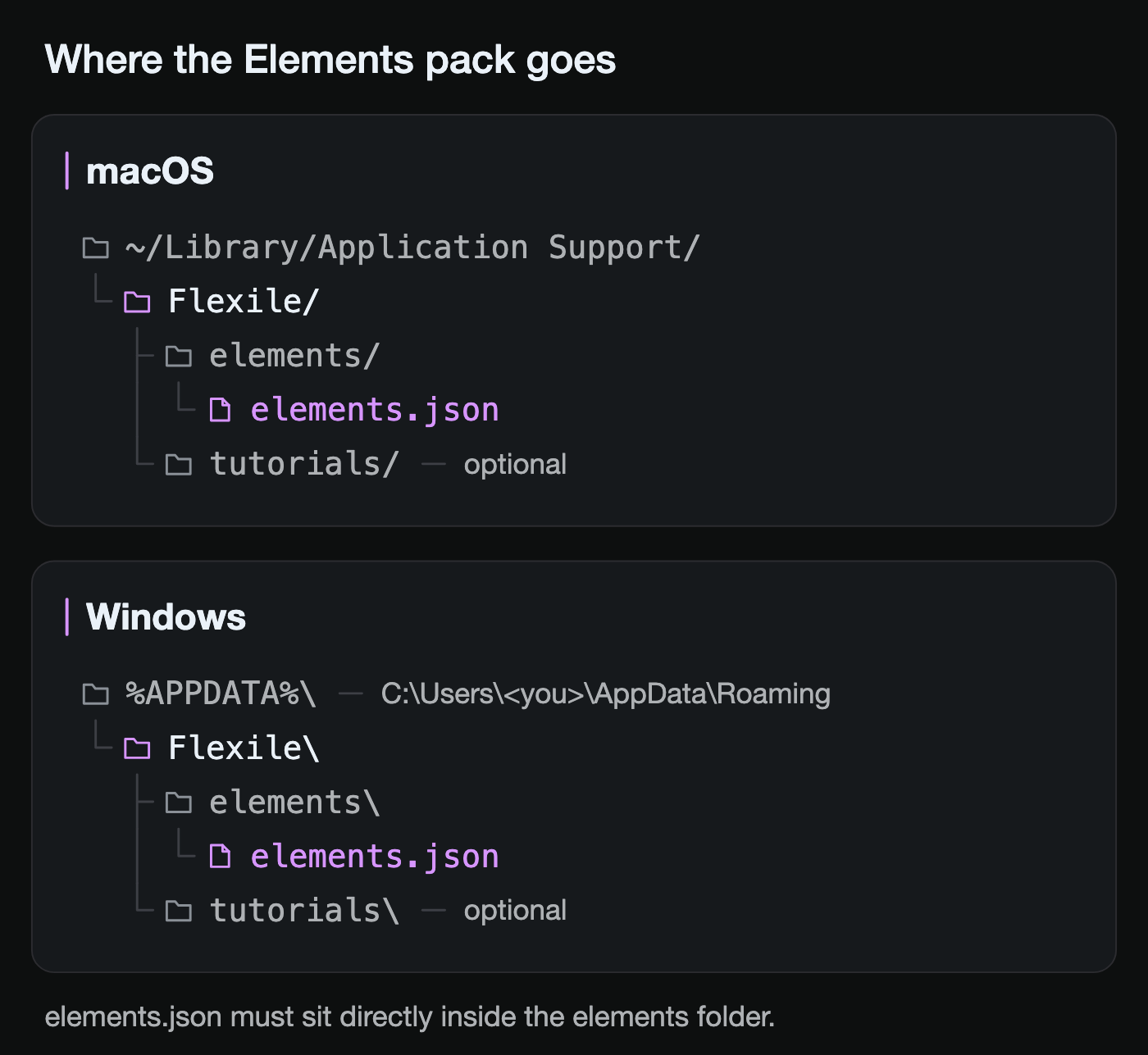
The Elements pack holds the transitions and effects with their previews (about 150 MB). Flexile downloads it in the background after you sign in, no restart needed. Install it by hand only if the download keeps failing.
Elements on macOS
- Download the Elements pack from the dashboard and unzip it.
- Open
~/Library/Application Support/Flexile(create it if missing) and inside it a folder namedelements. - Copy the unzipped contents into it so that
elements.jsonsits directly at~/Library/Application Support/Flexile/elements/elements.json. - Close and reopen the Flexile panel.
Elements on Windows
- Download the Elements pack from the dashboard and extract it.
- Open
%APPDATA%\Flexile(create it if missing) and inside it a folder namedelements. - Copy the extracted contents into it so that
elements.jsonsits directly atC:\Users\<you>\AppData\Roaming\Flexile\elements\elements.json. - Close and reopen the Flexile panel.
The tutorials pack works the same way and lives next to it in Flexile/tutorials. It is optional and downloads automatically too.
Updates
Flexile checks for updates after sign-in and in Settings > Version. Plugin and pack updates install themselves. When the extension itself updates, it installs the new version into a sibling folder named com.flexile.bc.io-<version> and asks you to restart After Effects. Once the new version runs, delete the old com.flexile.bc.io folder from the extensions directory so After Effects does not list Flexile twice.
Troubleshooting
- Flexile is not listed under Window > Extensions. Check that
CSXS/manifest.xmlis directly inside your extension folder, not in a nested subfolder, and that After Effects was fully quit and restarted after copying. - The panel opens blank. Re-extract the ZIP and make sure
app,jsandresourcesare next toCSXS. Then quit After Effects with Cmd + Q or from the File menu and start it again. - "Path is not valid: …/resources/flexile_*.ffx". The
resourcesfolder is missing. Re-extract the ZIP; if it still happens, re-download it, your copy may be incomplete. - The panel does not react when I select layers, or it is stuck on "Select Text". The plugin is not installed or is in the wrong folder. Follow the plugin steps above, check the exact path, and restart After Effects completely.
- I declined the Windows permission prompt. Open Settings > Version in the panel and start the update again, or install the plugin manually.
- Sign in with Google does nothing. Allow Flexile through the firewall when Windows or macOS asks, or sign in with email and password instead.
- The panel says the license is inactive. Flexile is currently free for everybody with an account. Sign out and in again; if it persists, write to us.
Clean reinstall
Quit After Effects, delete the items below that exist, then install again from the top of this guide.
Remove on macOS
~/Library/Application Support/Adobe/CEP/extensions/com.flexile.bc.ioand anycom.flexile.bc.io-<version>orflexile_<version>folders next to it~/Library/Application Support/Flexile(elements, tutorials and temporary downloads)~/Library/Application Support/Adobe/Common/Plug-ins/7.0/MediaCore/Flexile/Applications/Adobe After Effects <year>/Plug-ins/Flexileif you used the alternative location~/Library/Caches/CSXS/cep_cacheto clear the panel cache and the stored login
Remove on Windows
%APPDATA%\Adobe\CEP\extensions\com.flexile.bc.ioand anycom.flexile.bc.io-<version>folders next to it%APPDATA%\Flexile(elements, tutorials and temporary downloads)C:\Program Files\Adobe\Common\Plug-ins\7.0\MediaCore\Flexile(administrator rights)C:\Program Files\Adobe\Adobe After Effects <year>\Support Files\Plug-ins\Flexileif you used the alternative location%APPDATA%\Adobe\Common\Plug-ins\7.0\MediaCore\Flexile(a leftover from older installers, not used)
Need help?
Write to contact@flexile.io with your operating system, After Effects version and a screenshot of the panel. We will get back to you.