Loading...
Tutorials
Use Flexile with your AI assistant
Connect Claude, ChatGPT, Cursor or any MCP app to Flexile and let it animate, caption and check your After Effects projects. Set-up for every app, how it works, and prompts to try for each panel.
Sep 24, 2026
Tutorial
9 min read
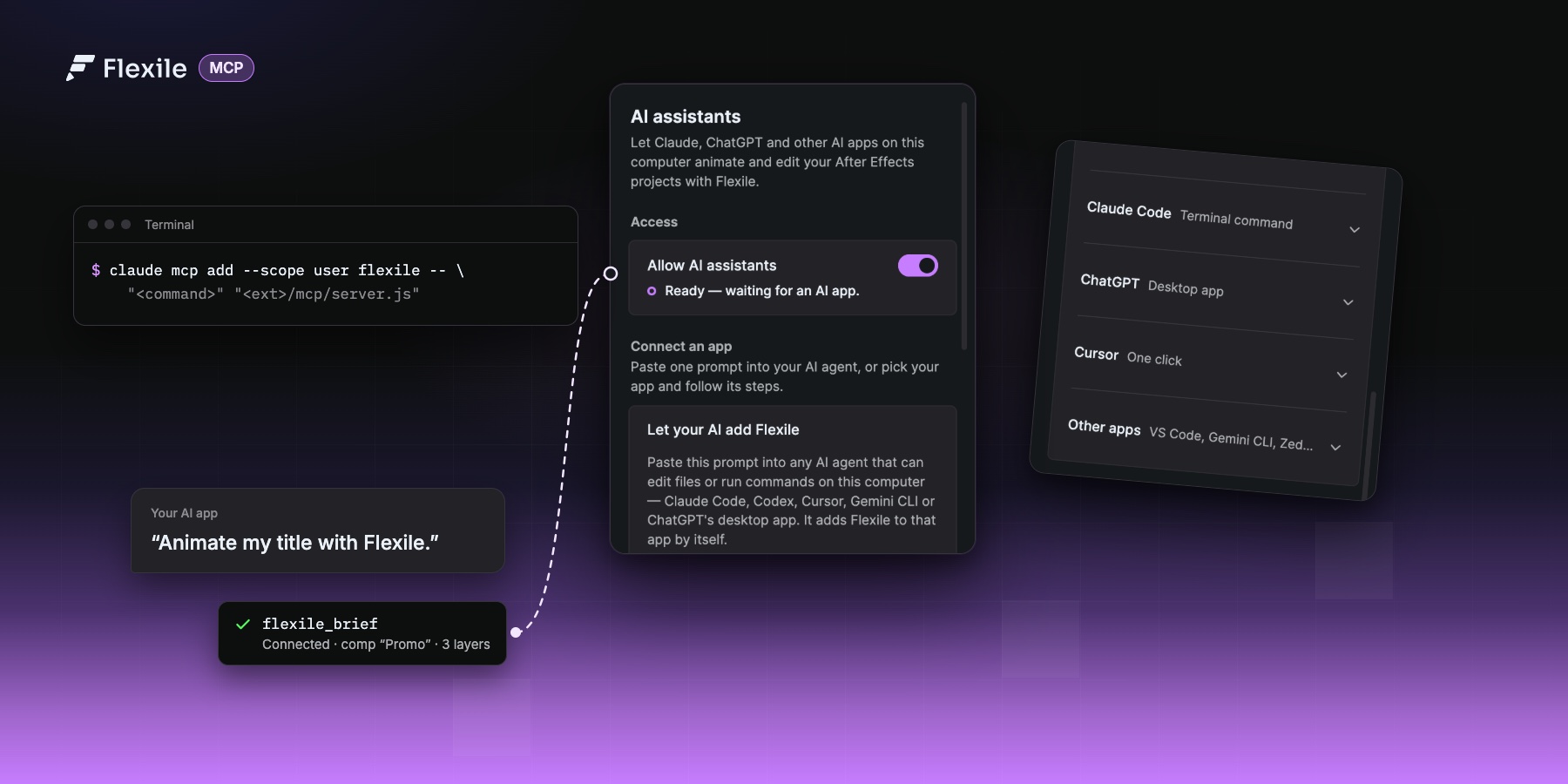
Flexile 0.17 comes with an MCP server, so the AI app you already use can work in After Effects for you. Ask for a title reveal, a staggered slide-in, subtitles or a tool of your own, and the AI does it with Flexile’s easing, text engine, tools and audio, the same way the panel would.
In this guide
- How it works
- Before you start
- Connect your AI app
- Check that it works
- Prompts to try, panel by panel
- Tips, Troubleshooting and turning it off
How it works
MCP (Model Context Protocol) is the standard way AI apps call tools. Flexile’s extension includes a small MCP server. Your AI app starts it on your computer, and it talks to the Flexile panel that is open in After Effects. There is nothing extra to install: it runs on the Node.js that Flexile already ships.
- It uses Flexile, not guesswork. The AI picks curves from Flexile’s easing engine (Bezier, Smart and Peak modes, 37 named curves), builds text animation with the text engine (15 effects), runs the quick tools and your own tools, and uses the Audio page.
- It looks before and after. It reads the comp first (layers, timing, text), checks its own motion (safe area, contrast, easing, timing) and renders a small contact sheet to see the result.
- Every Flexile call is one undo step. Press
Cmd+Z/Ctrl+Zin After Effects to step back through what the AI changed. - You can see it working. While a request runs, the panel shows an AI notice with the step it is on.
- What leaves your computer. Flexile’s server runs locally. Your AI app sends what the AI reads (the comp’s layers and a few preview frames) to its own model, like anything else you share in that chat.
- Not everything is covered yet. Text, Animation, Tools and Audio work over MCP. The Elements panel, Learn and Settings are not available to the AI yet.
Before you start
- Flexile 0.17.0 or newer. The panel updates itself after a short countdown; see the installation guide if Flexile is not installed yet.
- A Flexile account, signed in inside the panel. Flexile is free for everybody with an account during the beta. Downloads are on your dashboard.
- The Flexile panel open in After Effects: Window > Extensions > Flexile for AE. The AI can only reach After Effects while the panel is open.
- Allow AI assistants switched on. It is on by default; you find it at the top of the panel’s AI page and in Settings.
Connect your AI app
Open the AI page in the Flexile panel. It lists the apps below and shows the exact paths for your computer, so copy from there instead of typing them. Below, <command> is Flexile’s bundled Node.js and <ext>/mcp/server.js is the server inside your installed extension.
Claude Desktop (one click)
- In Flexile’s AI page, click Connect Claude Desktop.
- Quit Claude Desktop completely, on Windows from the tray icon, then open it again.
- In a new chat, find Flexile under + > Connectors.
Flexile adds itself to claude_desktop_config.json, keeps your other servers and saves the previous file next to it as .flexile-backup. It also fixes the entry for you after a Flexile update.
Cursor (one click)
- Click Add to Cursor. Flexile writes
~/.cursor/mcp.jsonand keeps your other servers. - Restart Cursor if Flexile doesn’t show up in its MCP settings. If Cursor has never been opened on this computer, open it once first.
Claude Code
- Click Copy Claude Code command, paste it into a terminal and press Enter.
- Start a new Claude Code session.
/mcpshould list Flexile.
claude mcp add --scope user flexile -- "<command>" "<ext>/mcp/server.js"Copying the command also installs Flexile’s motion-design skill for Claude Code, so it knows the house rules for timing and easing.
ChatGPT desktop and Codex
- In the ChatGPT desktop app, open Settings > MCP servers (or Integrations and MCP) and choose Add server.
- Name it
flexileand choose STDIO. - Paste the Command and the Argument from Flexile’s AI page.
- Save, then choose Restart.
The Codex CLI and the Codex IDE extension share that set-up. From a terminal:
codex mcp add flexile -- "<command>" "<ext>/mcp/server.js"ChatGPT in a web browser can’t reach After Effects on your computer; use the desktop app.
VS Code, Zed and other MCP apps
Under Other apps in the AI page, pick the format your app reads and copy it. Merge it into the app’s MCP config and keep the servers that are already there. Most apps, including Gemini CLI, Cline, LM Studio and Windsurf, read this:
{
  "mcpServers": {
    "flexile": {
      "command": "<command>",
      "args": ["<ext>/mcp/server.js"]
    }
  }
}
VS Code: run MCP: Open User Configuration from the Command Palette and merge this in.
{
  "servers": {
    "flexile": {
      "type": "stdio",
      "command": "<command>",
      "args": ["<ext>/mcp/server.js"]
    }
  }
}
Zed: Settings > AI > MCP Servers > Add Local Server, or merge this into settings.json.
{
  "context_servers": {
    "flexile": {
      "command": "<command>",
      "args": ["<ext>/mcp/server.js"],
      "env": {}
    }
  }
}
Codex and the ChatGPT desktop app can also read it from ~/.codex/config.toml:
[mcp_servers.flexile]
command = '<command>'
args = ['<ext>/mcp/server.js']
Or let your AI set itself up
Click Copy setup prompt and paste it into any AI agent that can edit files or run commands on your computer: Claude Code, Codex, Cursor, Gemini CLI or the ChatGPT desktop app. It adds Flexile to that app, keeps your other servers and tells you to restart it.
Where the files are
In case you set an app up by hand, this is what the AI page fills in. On a Mac with Apple silicon, the extension folder is ~/Library/Application Support/Adobe/CEP/extensions/com.flexile.bc.io, the command is node_binaries/darwin-arm64/node inside it, and the argument is mcp/server.js. Intel Macs use darwin-x64. On Windows the folder is %APPDATA%\Adobe\CEP\extensions\com.flexile.bc.io and the command is node_binaries\win32-x64-msvc\node.exe. Config files need the full path, not ~ or %APPDATA%.
After an update the folder name can get a version suffix, such as com.flexile.bc.io-0_17_0. Claude Desktop and Cursor are updated automatically; set other apps up again from the AI page.
Check that it works
Restart your AI app, open a comp in After Effects and ask:
Animate my title with Flexile.
The first thing the AI does is call flexile_brief, which connects to the panel and reads your comp. The AI page then shows which app is connected. If something is missing, the AI tells you what to do:
- The panel is not running. Open Window > Extensions > Flexile for AE. If it is open, close and reopen it.
- AI access is off. Switch on Allow AI assistants in the panel.
- Nobody is signed in. Sign in inside the panel, then ask again.
Prompts to try, panel by panel
Use the layer names from your comp, say how it should feel, and let Flexile pick the details. Start with these and change the names to match your project.
Text
Make the title in my active comp look premium.
Reveal “Summer Drop” word by word, then fade it out at the end of the comp.
Give the lower third a type-on effect, one character at a time.
The AI builds these with Flexile’s text engine: IN and OUT animations, keyframe groups and range reveals by character, word or line.
Animation
Slide the three cards in from the left, staggered, with a smooth ease.
Re-ease every keyframe on the Logo layer with an expensive-looking ease-out.
Make the badge pop in with a little overshoot.
Existing keyframes are re-eased rather than replaced, and the AI samples the motion afterwards to catch hitches and linear keys.
Tools
Parent the selected layers to a new null.
Add a gentle wiggle to the Background layer.
Save a tool that staggers the selected layers by 2 frames, then run it.
Change my tool “Fade 10f” so it fades over 15 frames.
Tools the AI creates are Script or Expression tools. They land in Tools > Cloud Tools and sync to your account like the ones you make yourself. The AI can read, rename, edit, run and delete your own tools; the built-in tools stay read-only, and code is checked before it is saved.
Audio: beats
Make the logo pulse on every kick of the song.
Shake the title on each snare hit.
Drive the glow’s intensity with the bass.
Flexile analyses the song in your comp and writes one 0–100 % keyframe per frame to sliders on an Audio · <layer> null, plus a hit slider, a marker on each hit and the BPM. The AI then links your layers to those sliders with expressions.
Audio: subtitles and karaoke
Add subtitles to the voice-over in the Outline style.
Style the subtitles like my layer “Caption base”.
Here are the lyrics: … Time them to the song as karaoke captions and highlight each word in yellow.
Transcription runs on your computer with a Whisper model. The AI can’t download it for you: the first time, open Audio > Subtitles in the panel and click Download (the Small model is 190 MB and the engine comes with it).
Whole shots and checks
Create a 1080×1920 reel intro with the text “Summer Drop” and animate it in.
Check this comp for motion-design problems and fix them.
Elements
The Elements panel isn’t available over MCP yet. Add transitions and effects from the Elements library yourself; everything else in this guide works alongside them.
Tips
- Keep the Flexile panel open while you work with the AI, and close any open After Effects dialogs before you ask again if After Effects is busy.
- Saving the project and files written to disk can’t be undone, so the AI only saves when you ask it to.
- On macOS, if your AI app wants to take a screenshot of After Effects, allow it under System Settings > Privacy & Security > Screen Recording, then quit and reopen the app.
- The AI can run scripts in After Effects. Only paste prompts and instructions you trust, and review what it plans before big changes.
Troubleshooting
- Flexile isn’t listed in the AI app. Restart the AI app after setting it up.
- The AI says Flexile is off. Turn on Allow AI assistants in the panel, and keep the panel open in After Effects.
- Sign-in or licence errors. Sign in to Flexile. For a licence re-check, click once inside the panel.
- It stopped working after a Flexile update. Claude Desktop and Cursor are updated automatically. Set other apps up again.
- Still stuck? Ask your AI to run
flexile_doctor. It checks each step and names the first one that fails.
Turn it off
Switch off Allow AI assistants on the panel’s AI page. AI apps can’t reach After Effects until you switch it back on.